Free Shipping on all orders · Priority Mail Shipping with fee of $8.00
🎙
Divine Tribe Software · Open Source

song-forge

Type a vibe. Get a whole song. On your Mac. No cloud, no subscription.

HTML⭐ 1 starsOpen source
⭐ 1
GitHub Stars
💻 HTML
Primary Language
📅 May 2026
Last Updated
See it in action

Watch the demo

What it is

A free, local AI music generator that writes the lyrics, composes the music, and sings the vocals.

Suno wants $10 a month. Udio wants $10 a month. Every cloud AI music tool wants a subscription, your card, and your prompts on their servers forever. Song Forge doesn't. You describe a song — "sunset reggae with steel pan, 78 BPM, vocalist who sounds like Burning Spear" — and a couple of minutes later you've got a finished track in your library, generated entirely on your own Mac.

Drop in a 10-second sample of anyone speaking and Song Forge will re-sing the entire song in their voice. Yours. Your kid's. A friend's. Even a 'group of kids' choir effect that layers four pitched copies for an instant children's-choir vibe. Every byte of audio is generated on-device. Nothing ever leaves the laptop.

Why it's different

What makes song-forge special

15 seconds for a song

On the M5 Max, a 2-minute track finishes in about fifteen seconds. M2/M3 Pro takes 30–60 seconds. Either way, faster than the cloud.

🎤

Voice swap any track

seed-vc clones any voice from a 10-second sample. Your songs in your voice, forever.

✍️

Lyrics auto-written

Gemma writes verse/chorus lyrics in the right style — locally. Or paste your own with [verse] and [chorus] tags.

🎛️

Fine-tune everything

Era, mood, vocal character, tempo, reference artists, extra instruments. Every knob feeds the same prompt.

💸

$0 forever

No subscription. No login. No API keys. No corporation that can shut it off or pivot away.

✈️

Works offline

After the initial model download, it runs with the Wi-Fi off. Make 100 songs on a plane.

Who it's for

Is this for you?

  • Musicians who want to sketch ideas without paying a monthly toll
  • Creators who refuse to feed a cloud service their voice and prompts
  • Hobbyists who want to hear themselves singing reggae, hip-hop, opera
  • Parents who want a 'kids' choir' version of every track they make
How to get it

Getting started in minutes

1

Install LM Studio

Pull a Gemma model and hit Start Server. That's the lyric writer.

2

Set up the music engine

Clone ACE-Step into the engines folder. The supervisor script wires it up.

3

Run forge_supervisor.sh

Open localhost:8767, hit FORGE A SONG, type your vibe.

Ready to try song-forge?

It's free, open source, and runs on the hardware you already own. Head to GitHub to get started, or drop a star to help us keep building in public.

Stay in the tribe

More from Divine Tribe

Full technical docs

The complete README

Open the GitHub README — every detail, every benchmark, every code block

🎙 Song Forge

Type a vibe. Get a whole song. On your own Mac. No cloud, no subscription, no API keys.

You write something like "sunset reggae with steel pan and a male vocalist who sounds like Burning Spear, 78 bpm" — Song Forge writes lyrics for you (or you can write your own), an AI composes the music and the vocals, and a couple minutes later you've got a finished track in your Library. Drop your own voice sample in and it'll re-sing the song in your voice — or your kid's, or anyone you've recorded.

Everything happens on your Mac. Nothing ever leaves it.


📺 Watch it in action

Song Forge — FREE Local AI Music Generator (No Cloud)

A full walkthrough on YouTube — describing a vibe, generating the song, swapping in a cloned voice. Click the thumbnail above to watch.


🎬 What it actually does

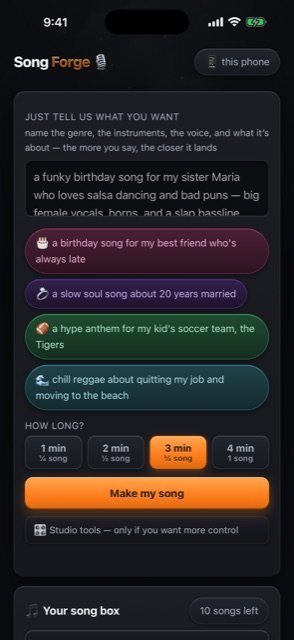
  • You describe a song — pick a genre preset, mix in mood / era / tempo / reference artists, fine-tune the vocal arrangement.
  • The AI writes the lyrics for you in the right style (or paste your own — [verse]/[chorus] tags work).
  • It generates the song — music and vocals — in about 15 seconds on a beefy Mac (a couple minutes on a normal one).
  • Library keeps every track you've made. Play, rename, save the WAV, delete.
  • Voice swap any track into a cloned voice. Drop a 10-second sample of someone speaking into the voices folder, and Song Forge will re-sing the whole song in their voice. There's even a "group of kids" effect that layers 4 pitched copies for a children's choir feel.

💻 What kind of computer do I need?

Apple Silicon Mac. Sorry Intel folks — the music model uses Apple's MLX framework, which needs an M-series chip.

Your Mac What you'll get
M1/M2 with 16 GB RAM Lyrics + music will work, but you'll have to skip Gemma (the lyric writer) or run a smaller model. Songs take ~2 min. Voice swap is tight on memory.
M2/M3 Pro/Max, 32 GB RAM Sweet spot for most people. Run everything comfortably. Songs in 30–60 seconds.
M3/M4 Max, 64 GB+ RAM Snappy. Songs in 20–30 seconds. Multiple jobs at once if you want.
M5 Max, 128 GB RAM (my machine) About 15 seconds for a 2-minute song. Voice swap in under a minute. Everything stays buttery.

Disk: Plan for ~30 GB free for the AI models the first time you set it up. Generated songs are ~20 MB each — get a hundred and you've used 2 GB.

Microphone (optional): Only needed if you want to record your own voice samples for the voice-swap feature.

Internet: Required once to download the models. After that — totally offline. Take it on a plane.


🚀 Get started

1. Install LM Studio (for the lyric writer) → lmstudio.ai, pull a Gemma model, hit "Start Server."

2. Set up the music engine — clone ACE-Step somewhere on your machine. The supervisor script expects it.

3. Install seed-vc and demucs for the voice-swap pipeline (pip install seed-vc demucs).

4. Run it:

bash forge_supervisor.sh

Open http://localhost:8767 and hit FORGE A SONG.


🎛 What's under the hood

Component Role
ACE-Step 1.5 The music brain. Generates instrumentation + vocals from your style description. (MLX backend on Apple Silicon.)
Gemma 4 31B (via LM Studio) The lyricist. Writes verse/chorus lyrics that fit your genre.
Demucs Splits a finished song into vocals + instrumental.
seed-vc (Plachta) Zero-shot voice cloning. Give it a 10-second sample of someone, it'll re-sing any vocal in their voice.
ffmpeg Mixes the new vocals back over the instrumental, loudness-normalized to −14 LUFS so it sounds pro.
forge_server.py The Python web server that ties it all together. Runs on port 8767.
index.html The whole web UI — liquid-glass theme, drifting cosmic colors, big chunky buttons.

🪄 Cool things to try

  • Generate the same lyrics in five different genres — paste the same [verse]/[chorus] block, change the style preset, hit MAKE. You'll have five wildly different versions of your song in two minutes.
  • Drop a sample of yourself reading a paragraph into the voices folder. Voice-swap any song to your voice. Yes, it's surreal.
  • Use the "group of kids" effect for an instant children's-choir version of any chorus.
  • Type a banned-phrases list (concrete jungle, one love, irie, etc.) — Gemma will refuse to use them in lyrics.
  • Open Fine Tune — control era, mood, vocal character, tempo, reference artists, extra instruments. Each one stacks cleanly into the style description.

⚠️ Heads up

This is a personal project. No license assigned, no support promised, no warranty. Built it for myself and put it up because someone might learn from it.

Models are large. Setup takes a minute. But once it's running it's just… yours. Forever. Offline. No one tracking what you make. No subscription that disappears when the company pivots.

Have fun.