▶ Watch the demo on YouTube


An autonomous agent that runs entirely on Apple Silicon — it drives your real browser and your Mac. No cloud APIs, no Claude Code overhead, no MCP layer. Direct MLX inference + Chrome DevTools Protocol, plus a shell/file/media toolbelt for everything that isn't the web.
Started life as a pure browser agent. It has since grown a full system toolbelt (shell, files, screenshots, screen recording, send-to-phone), so it now handles end-to-end tasks like "find X on the web, run a script, and text me the result" in one session — all locally.
Running more than one agent against the same browser? Use browser-broker — it leases each agent its own tab in an off-screen window that still renders, so agents never fight over tabs or touch the one you're reading.
User prompt → Local LLM (MLX) → ┬─ Chrome DevTools Protocol → Brave Browser
                   ↑             ├─ shell / read_file / write_file → macOS
             ~2–5s per step      ├─ screenshot / fullscreen_shot → send to phone
                                 └─ Studio Record → screen video → send to phone
Default model: Gemma 4 31B Instruct abliterated (4-bit quantized) via MLX on Apple Silicon
Alternative models: any MLX-compatible model, swap via the MLX_MODEL env var. In our Sep 16 four-tab test Gemma 4 31B and Qwen 3.8 27B both got 8/8; Gemma was about 30% faster
Browser: Brave with remote debugging on port 9222
Protocol: CDP WebSocket — no MCP, no proxy, direct connection
This agent shares its brain and plumbing with a few sibling projects, all running on-device:
- claude-code-local — the MLX inference server (Anthropic Messages API + tool parsing) this agent talks to, plus the desktop launchers. Set it up first.
- NarrateClaude — the same local stack wired for voice narration; this agent's "send to phone" and media tooling come from the same family.
You don't need the whole ecosystem to run the agent — just the MLX server from claude-code-local — but it's built to compose with them.
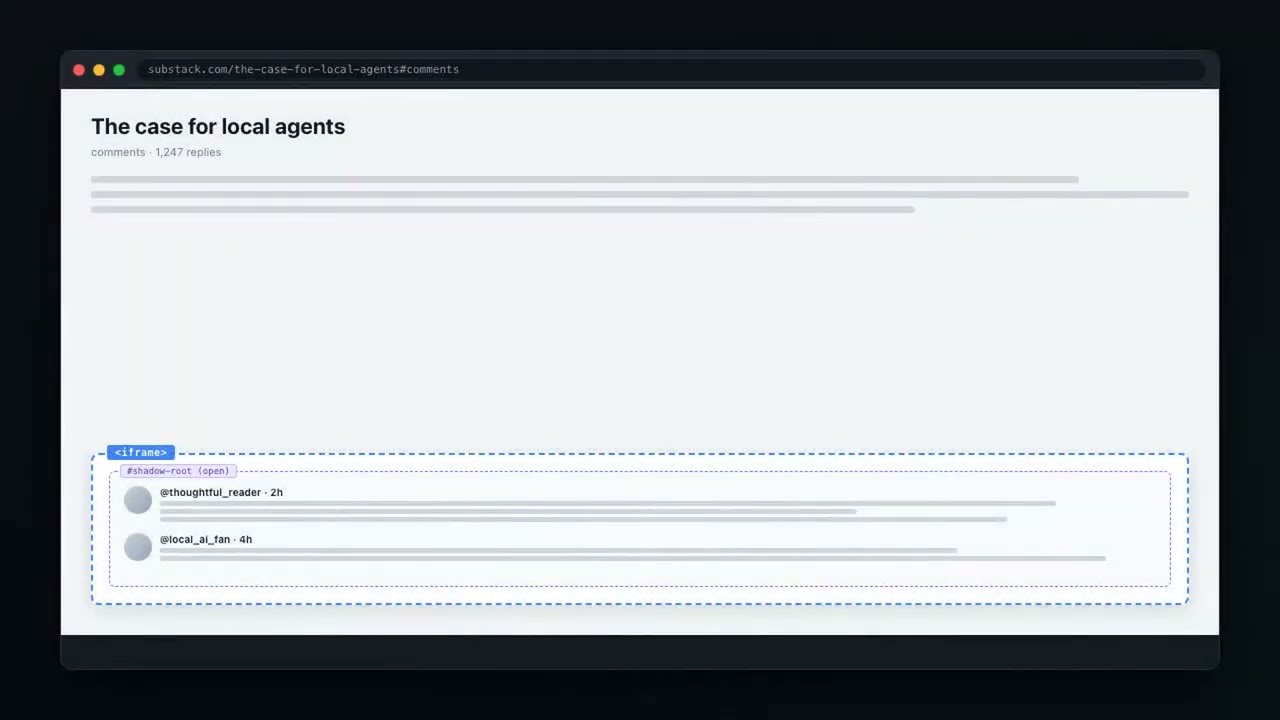
Most news sites (Yahoo, etc.) load interactive widgets (e.g. OpenWeb/SpotIM comments) inside:
- A cross-origin iframe (JavaScript can't access it)
- A Shadow DOM (normal querySelector can't find elements)
- A ProseMirror rich text editor (innerHTML doesn't work)
Standard browser automation tools (Playwright, Selenium, MCP) fail at all three layers.
This agent uses CDP primitives that bypass all of them:
DOM.getDocument(depth: -1, pierce: true)    # Exposes everything across iframes + Shadow DOM
DOM.performSearch(".ProseMirror")            # Finds the editor in any context
DOM.focus(nodeId)                            # Focuses it regardless of origin
Input.insertText(text)                       # Types into the focused element
This works because CDP operates at the browser level, not the page level. Same-origin policy doesn't apply. Because it drives your real, logged-in Brave over CDP (not a fresh Playwright profile), authenticated sites just work.
The model controls everything through JSON tool calls — one per turn, or a batch: it can return a JSON array of up to 5 calls that execute back-to-back on a single model turn (fill three fields, click submit — one think instead of four). After navigate/click/type_text/scroll, the fresh page state is attached to the result automatically (once per batch, after the last action), so it rarely needs a separate snapshot.
navigate(url)— go to a pagesnapshot()— get the page's elements with UIDs (rarely needed; auto-attached after actions)click(uid)— click an element by UIDtype_text(uid, text)— type into a field by UID (one-shotInput.insertText— instant, even for long text)scroll(direction)—"up"/"down"js(code)— run arbitrary JavaScript and return a value
shell(cmd, timeout?)— run any bash command (default cwd =$HOME). First choice for git, ssh, curl, wp-cli, python, npm, file ops — anything the terminal handles in one lineread_file(path)— read a file or list a directory (~expands)write_file(path, content)— overwrite a file, creating parent dirs
screenshot()— capture the current Brave tab and text itfullscreen_shot()— capture the whole Mac desktop (all displays) and text itsend_image(url)/send_video(url)— download a URL and text itrecord_start(mode)— start Studio Record (screen/face/screen_face)record_stop()— stop recording and auto-text the.mp4
done(message)— task complete (also used for conversational answers)
- macOS with Apple Silicon (M-series), 32 GB+ unified memory recommended
- Brave Browser (or Chrome) with remote debugging
- Python 3.12+ with MLX
pip install mlx mlx-lm websocketsThe agent talks to a local MLX inference server that speaks Anthropic's Messages API. It ships with the companion repo claude-code-local — set that up first. Once installed, the server lives at ~/.local/mlx-native-server/server.py and is auto-started by the desktop launcher.
Double-click Gemma 4 Browser.command (from the claude-code-local repo's launchers/Browser Agent.command). It will:
- Start the MLX server with Gemma 4 31B if it isn't already running
- Start Brave with
--remote-debugging-port=9222if it isn't already running - Ensure at least one page tab exists
- Hand off to the Python agent
The media tools (screenshot, record_*, send_*) shell out to local helper scripts (~/.claude/imessage-*.sh, Studio Record). They degrade gracefully — if a helper isn't present, that tool just reports it's unavailable; the rest of the agent runs fine.
python agent.py
# Prompts: "What should I do?"
# Type tasks, get results, stays open for the next task
# Type "quit" to exit
# Errors in one task no longer kill the session — you get a message and a fresh promptpython agent.py "Find an article about Iran on Yahoo and draft a comment"
python agent.py "cd into my site repo, run the build, and text me a screenshot when it's done"MLX_MODEL="lmstudio-community/Qwen3.8-27B-MLX-8bit" python agent.pyWeb + system in one go
Find the newest release on the MLX GitHub, save the changelog to ~/Desktop/mlx-notes.txt, and text me a screenshot of the release page.
Comment on a news article (the original use case — leaves it in draft for review)
Find an article about Iran on Yahoo and make a comment. Don't post it, just leave it in draft.
The agent navigates, finds the article, reads it, drafts a 2–3 sentence comment, pierces the cross-origin iframe + Shadow DOM to type it, scrolls so you can see it, and does not click Send.
Pure terminal task (no browser opened)
Show me which of my LaunchAgents failed to load and tail the last 20 lines of each one's log.
- Batched actions, guarded — a batch executes in order, stops at the first error (skipping the rest so a broken plan can't keep firing), and reports every action's result numbered so the model knows exactly how far it got.
- Auto-attached page state — the fresh DOM is returned with each action result (once per batch), so the model doesn't waste turns re-snapshotting.
- Loop detection — if the same UID is clicked more than twice, the agent presses Escape (to dismiss any overlay) and forces a fresh snapshot so the model tries a different path.
- Error recovery — any exception during a task (MLX timeout, CDP websocket drop, malformed output) is caught by the main loop; you get the error and a fresh prompt instead of a crash.
Two things are true at once: every individual browser action is near-instant, and a full task still takes tens of seconds — because the model reasons for 2–5s between each action. We profiled the whole pipeline against real pages (M-series Mac, isolated tab, warm cache) to find out exactly where the time goes.
Per-operation — the browser mechanics (all sub-second):
| Operation | Time | Notes |
|---|---|---|
Type text (Input.insertText) |
~1 ms | was ~108 ms char-by-char — 117× faster on a 300-char field |
| Page snapshot (a11y tree) | 2 ms → ~330 ms | near-instant on light pages, heavier on content-dense ones (Wikipedia) |
| Navigate + wait-for-ready | 150–370 ms | polls readyState instead of sleeping a fixed worst-case |
| Scroll | ~150 ms | |
js() eval |
<1 ms |
Per-step — where the time actually goes:
| Metric | Value |
|---|---|
| Model reasoning per step | 2,000–5,000 ms (≈99% of a step) |
| Comment generation | ~8 s |
| Total for a comment task | ~20–30 s |
The honest takeaway from profiling: the browser was never the bottleneck — the local model is. Typing, clicking, scrolling, and reading the page are all sub-second (typing is now effectively free). Total task time ≈ per-step model latency × number of steps, so the real speed levers are a faster local model or fewer steps per task — not faster browser plumbing.
That's exactly what batch mode attacks. The model can return an array of up to 5 tool calls that execute in sequence on one turn. A fill-two-fields-and-submit sequence that used to cost three model thinks (~6–15 s) now costs one (~2–5 s). The safety rules keep it honest: element uids only exist for a page the model has already seen, so it's told never to batch a click/type against a page it hasn't loaded yet; an error mid-batch stops the remaining actions immediately and hands control back to the model with the numbered results; and the auto-snapshot runs once after the batch's last action instead of after every action.
- Typing is one call, not hundreds.
type_textused to dispatch akeyDown+keyUppair for every character — 400 WebSocket round-trips to type a 200-char comment. It now sends the whole string in a singleInput.insertText, with a one-key arrow nudge to wake up search-as-you-type/React listeners, and a per-character fallback for the rare field that rejects bulk insert. Works the same in plain inputs, textareas, and contenteditable/rich editors. Measured 117× faster. - No more blind sleeps. The fixed waits after
navigate/click/scrollwere trimmed hard (navigate settle 300→150 ms, scroll 500→150 ms, click 200→80 ms). Navigation still pollsreadyStatefor correctness — it just stops waiting the instant the page is genuinely ready instead of always sleeping the worst case.
agent.py— the agent (single file)~/.local/mlx-native-server/server.py— MLX inference server (ships with claude-code-local)launchers/Browser Agent.command— desktop launcher (ships with claude-code-local, surfaces asGemma 4 Browser.command)
- MLX — Apple's ML framework for Apple Silicon
- Gemma 4 31B — instruction-tuned, abliterated and 4-bit quantized
- Chrome DevTools Protocol — direct browser control via WebSocket
- No cloud APIs, no subscriptions, no data leaving your machine
Plenty of good people are working on agents that drive a browser. If this one doesn't fit, one of these might:
- browser-use is a Python library for building browser agents on top of whichever model you like. The most complete option if you want to build your own agent.
- chrome-devtools-mcp, from the Chrome DevTools team, gives coding agents like Claude Code direct control of Chrome over MCP, including performance traces.
- Playwright MCP does the same through Playwright and the page's accessibility tree, so the model works from structure instead of screenshots.
- agent-browser is a browser automation CLI built for AI agents to call.
This one is small on purpose: one file, a local MLX model, and raw CDP, so nothing leaves your Mac.
Open an issue with the task you gave it, the site, and the last lines of output. Whose work this is built on is in CREDITS.md.
Builders running this stack hang out in the NiceDreamzApps Discord — quiet, builder-tone, no bots. Share what you're scraping, what's breaking, what local model worked for which site.