
📬What it actually does
You point the phone at a piece of mail and press one button. A second later it says one sentence out loud: what the thing is, who sent it, the number that matters, the deadline, and what happens if you miss it. That is the whole feature. It is called Summarize and it lives in RealTime AI Camera, the app I build for blind users.
One sentence sounds easy until you try it. A blind user cannot skim. They cannot glance at the letterhead and decide whether this is worth their time. Whatever the phone says is the entire document as far as they are concerned. So the sentence has to be right, and it has to be right about the part that matters, not the part that is biggest on the page.
🧱The old way hit a wall at 97.7 percent
The first version did it the ordinary way. Apple’s text recognition pulls the words off the photo, then a small language model turns those words into a sentence. I trained that language model myself on about sixteen thousand examples and I kept training it. Twenty passes. It got to 97.7 percent on my test set around pass eleven and then it simply stopped moving. Pass eleven, pass twenty, pass thirty-two, all the same number.
That flatness told me something. I was tuning the wrong half. The failures were not in the writing, they were upstream. The text recognition was garbling the page before my model ever saw a word of it, and no amount of teaching the writer to write better fixes a page that arrived scrambled.
👁️So I deleted the middleman
The new version has no text recognition step at all. A vision model looks at the photograph directly and speaks. It sees the layout, the letterhead, which number is the amount and which is the account number, and the fact that the important line is in small print at the bottom. All the things that get flattened away the moment you turn a page into a plain list of words.
The model is small enough to live on the phone. It is a two billion parameter student, quantized down to 1.2 gigabytes, and it runs entirely on the device. No wifi, no server, nobody’s cloud. That was my hard requirement from the first night and I never moved off it. Someone’s tax notice and someone’s medical bill are not going to take a trip through my infrastructure so a phone can describe them.
🏭Nobody had built this dataset, so I built it
There is no public dataset of documents paired with “here is what this means to a person who cannot see it.” So I made one. I rendered thousands of pages, bills, notices, letters, forms, junk mail, then ran them through a library that adds realistic paper damage: the coffee stain, the crooked scan, the blown highlight. Then I pointed a twenty-seven billion parameter teacher model at every page and had it write the ideal answer. The small model learned from the big model’s answers.
For scenes rather than paper I used the VizWiz caption set, which is photographs actually taken by blind people. That matters more than it sounds like it does, because photos taken by someone who cannot see the frame are tilted and cropped and lit badly in very particular ways. The teacher would not fit in memory at full precision, so it ran compressed and captioned about five seconds a photo, seven thousand seven hundred and fifty of them. That part was just waiting.
🚨The round where it learned exactly the wrong lesson
This is the part worth telling. Round three scored well and I almost shipped it. Then I read the misses one at a time instead of trusting the number, and found it calling a tax notice an advertisement.
Here is why. Two of the fonts I had been rendering pages with have no English letters in them at all. One is a Hebrew face, the other is a set of typographic ornaments. When the renderer reached for those it produced a page of empty boxes. About four percent of my training pages came out as gibberish, and every one of them was still labeled with a real answer. So the model learned a rule I never intended and never noticed: if you cannot read the page, it is junk mail.
That is the most dangerous direction the error could possibly point. An unreadable letter is not a reason to relax. It is more likely to be the important one, and this thing was telling people to ignore it. A scoring number would never have shown me that. It only turned up because I sat and read what it said about the pages it got wrong.
The fix was small. I wrote a check that opens every font and asks whether it actually contains the English alphabet, kept the ones that do, threw out the rest, re-rendered everything and retrained. The whole failure class disappeared.
🙅Teaching it to say “I can’t read this”
The other thing a blind user cannot do is see that the photo came out badly. So the model has to notice for them. I built a set of deliberately ruined pages, blurred, dark, glared, half out of frame, and taught it that the right answer for those is not a guess. The right answer is: I can’t read this, hold the camera closer and square on, and get the whole thing in the frame.
It now does that on thirty-five out of thirty-six unreadable pages. The earlier version only caught twenty-five of them and confidently made up the rest, which is the worst behavior available. I would rather it ask for a second photo a hundred times than invent a due date once.
📱Getting it onto an actual phone
Working on the laptop and working on the phone are different sports. It crashed three times for three unrelated reasons. The runtime had a bug with this model shape and needed a version bump. Then iOS killed it for using 2.4 gigabytes, which I fixed by compressing the vision half of the model too, not just the language half. That took it to 1.2 gigabytes with no measurable loss. Then it kept dying anyway, and it turned out the camera preview was quietly holding a gigabyte and a half of its own, so now the camera stops while the model thinks and starts again when it finishes.
After that it just worked. I walked around Arcata with it, ten scans in forty-five minutes, from a dim bedroom to a bright plaza full of people, no crashes. It read the sign on Culture Hall. It read “Taqueria La Barca, 785 9th Street” off a storefront across the road.
🗣️What it sounds like now
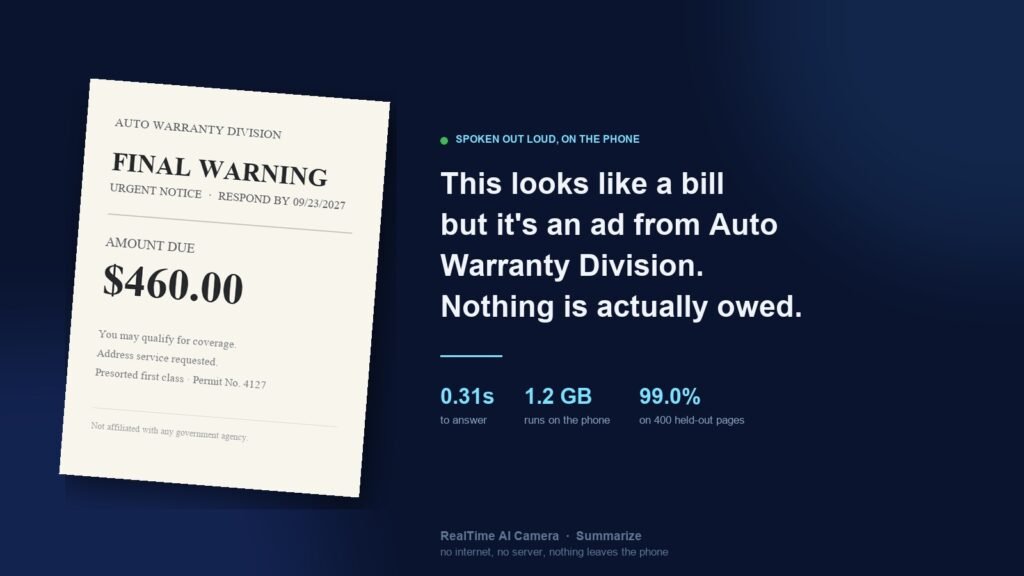
My favorite answer in the whole test set is not the hardest one. It is a piece of junk mail dressed up to look like a bill. FINAL WARNING across the top, AMOUNT DUE $460 in big type, and down at the bottom in small print, “not affiliated with any government agency.”
The model says: “This looks like a bill but it’s an ad from Auto Warranty Division. Nothing is actually owed.”
For someone who can see, that is a mildly useful sentence. For someone who cannot, that is the difference between throwing away a piece of paper and mailing a stranger four hundred and sixty dollars. That one sentence is the reason I spent the week on this.
🪶The one that will actually ship
The two billion parameter model proved the idea, but it is a lot to ask of a phone. On my own iPhone 14 Pro Max, 1.2 gigabytes of weights on top of the live camera and the object detection RealTime AI Camera already runs blew past the memory iOS normally allows an app, and I had to request Apple’s extended-memory allowance just to keep it alive. That works for me. It is not what I want to ship to everyone.
So I trained the same recipe into a model less than half the size, for the version of Summarize that goes into RealTime AI Camera. It came out at 622 megabytes and scored 98.5 percent, right on the heels of the big one. On my Mac it answers in a fraction of a second. The interesting wrinkle is that the small one falls apart if you compress its vision half the way I compressed the big one’s. The big model tolerates it for free; the small one drops from 98.5 to 91.5. So it keeps its eyes at full precision and stays small everywhere else.
I put it on my phone tonight, and the thing I most wanted to know came back right: it runs without the extended-memory allowance the big model needed, and it read a real IRS letter correctly on the first try. It is slower on the phone than on my desk, several seconds a page rather than the blink it takes on the Mac, and making it quick is the next piece of work. But it fits, it runs clean, and it does not need special permission to stay alive. That is the version that ships.
🧭The part I keep coming back to
Every real improvement in this project came from reading what the model said, not from watching the score. The score sat flat for twenty rounds while I trained the wrong half and it never once hinted why. The score looked fine while the model was quietly learning to call tax notices junk mail. The number never told me what was actually broken.
I build this alone, on a Mac, for people who will never see the screen I am looking at. That is the whole operation. And this is the kind of work I love.